
KN004: Verifying What Karui Sends Off Your iPhone
How to check for yourself that Karui sends none of your data off your iPhone, which Apple domains it contacts and why, and what changes when you turn on Private Cloud Sorting or use Karui for Mac.
Overview
Karui is a private iPhone notification filter. It has no account and sends no analytics, and unless you join the invite-only Karui Cloud Sorting, it has no server. The app isn’t open source, and even if it were, you couldn’t easily confirm that the build from the App Store matches the published code. This note shows how to test the app installed on your iPhone.
What’s in the app
- No server of its own. Every connection Karui makes goes to Apple, through Apple’s frameworks: the App Store framework, and iCloud’s CloudKit for Karui for Mac, both described below.
- No third-party SDKs: no analytics, advertising, or crash reporting. Karui uses only Apple’s frameworks.
- History, settings, and VIPs stay in the app’s own storage on your iPhone. They reach your own iCloud account only if you use Karui for Mac and turn on Show History on your Mac.
- Diagnostic logs record timings, counts, and categories, never notification text. They stay in your iPhone’s system log and leave the device only if you share a diagnostics report yourself.
- Crash reports reach me only if you’ve turned on Share iPhone Analytics and Share with App Developers in iOS Settings. Apple collects and anonymizes them, not Karui.
Check with App Privacy Report
iOS can record which domains each app contacts. Karui can’t hide from it or turn it off.
- Open Settings › Privacy & Security › App Privacy Report, and turn it on.
- Use your iPhone normally for a day or more, so Karui sorts notifications in the background too.
- Come back and look for Karui under App Network Activity.
You may see Karui there with the Apple domains described next, and nothing else. With Karui Cloud Sorting on, you’ll also see Karui’s own server, karui-backend.vercel.app. Language downloads for translation are made by iOS, not by Karui. Private Cloud Sorting requests reach Private Cloud Compute through iOS itself: in my report, with Private Cloud Sorting answering dozens of times a day, no app listed a Private Cloud Compute domain, not even Shortcuts.
Apple domains you may see
In a week with a TestFlight build and Karui for Mac, my App Privacy Report listed five domains under Karui, all Apple’s. The two below come from Apple’s App Store framework and carry none of your notifications, contacts, calendar events, or settings; how often they appear depends on how often you open Karui’s Settings, since that’s when it asks StoreKit about the build. gateway.icloud.com and metrics.icloud.com are iCloud, described in the next section. ropes.apple.com appeared twice that week; I haven’t yet found which of Apple’s frameworks contacts it.
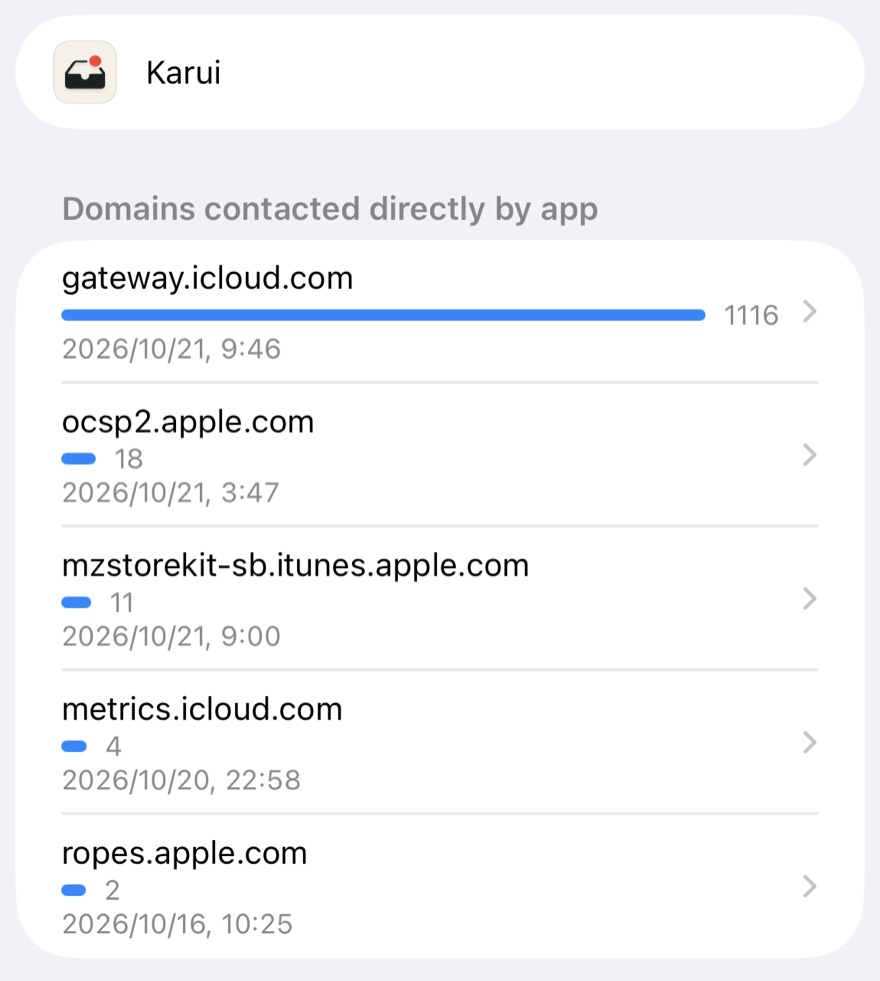
- mzstorekit.itunes.apple.com, or mzstorekit-sb.itunes.apple.com in TestFlight and Xcode builds: the App Store’s StoreKit service. Karui asks StoreKit whether it’s a TestFlight build, to show developer tools only there. StoreKit gets the answer from Apple as a signed record of your download and keeps a copy on your iPhone, so it only reaches the App Store now and then.
- ocsp2.apple.com: certificate validation. iOS checks that a certificate hasn’t been revoked, most likely the one Apple signed that record with.
Both connections are made by Apple’s frameworks inside Karui, so iOS lists them under Karui. Many other App Store apps in the same report contacted mzstorekit.itunes.apple.com too.
The exact host names are Apple’s and may change. Apple lists the domains behind its services, including *.itunes.apple.com and ocsp2.apple.com, in Use Apple products on enterprise networks, and notes there that some of the names behind them are subject to change.
iCloud and Karui for Mac
Karui for Mac is a separate, optional app. It and Karui on your iPhone have no server between them: they pass records through the private database of your own iCloud account, in Karui’s iCloud container, using Apple’s CloudKit. App Privacy Report lists this under Karui as gateway.icloud.com, CloudKit’s address.
Without Karui for Mac, Karui still looks: each time you open it, it makes one read-only query of your iCloud database, for a Mac that has set up Karui for Mac. Without a Mac it finds nothing. Karui writes nothing to iCloud, subscribes to nothing, and makes no iCloud request when it sorts a notification in the background. Before Karui 0.2.2, each open also made three more read-only queries, for things only a Mac leaves, like messages you read on it.
Once Karui has seen a Mac running Karui for Mac, there’s more, which is why gateway.icloud.com can show hundreds or thousands of connections a week:
- Each notification Karui sorts: two queries for what you read or did on the Mac since, and, before an alert, one for whether you’re using the Mac right now. While you are, the alert waits until you leave and arrives only if you haven’t read it there.
- Opening a notification: one lookup for the Mac’s link to the exact message, unless Karui already has it.
- Silent pushes: Karui subscribes once to changes the Mac makes, such as a message read there or you leaving the Mac, and iCloud wakes Karui briefly when one happens. iOS delivers these pushes, so they don’t appear under Karui.
- Writes, only with Show History on your Mac turned on: Karui’s decision about each notification, so the Mac can show your History, and your sorting settings, so the Mac sorts as your iPhone does.
What each record holds, what’s end-to-end encrypted, and how long it’s kept are in Karui’s privacy policy. Notification text, your settings, and your contacts’ details are always end-to-end encrypted. With Advanced Data Protection on for your Apple Account, the rest is too.
App Privacy Report may also list metrics.icloud.com under Karui a few times a week. That’s CloudKit reporting how its own requests performed to Apple, made by Apple’s framework, not by Karui.
Calendar and contacts access
App Privacy Report also lists which data each app reads, under Data & Sensor Access. Karui may appear there. That’s reading on your iPhone, not sending anything:
- Calendars: if you allow calendar access, Karui reads your upcoming events each time it sorts a notification, and for Auto Reply during meetings.
- Contacts: Karui never reads your whole address book. When you add VIPs, in setup or in Settings, iOS’s contact picker gives Karui only the contacts you choose.
What Private Cloud Sorting sends
Since Karui 0.2.0, setup offers Private Cloud Sorting turned on. Karui makes the request itself when it can, through Apple’s Foundation Models framework, and your Karui shortcut makes it with the Use Model action set to Private Cloud Compute while Apple Intelligence on your iPhone is busy. Open the shortcut in the Shortcuts app to see its step for yourself. KN002 describes the round trip.
The request contains the notification’s text and app name, whether the app is one of your important apps, your name, handles, and any nickname, and your sorting terms. Notifications Karui decides by its own rules, your VIP contact details, and your calendar events are never sent. If you delete that step or turn Private Cloud Sorting off, nothing leaves your iPhone.
Apple describes the protections in Private Cloud Compute on its security blog.
Watching traffic with a proxy
You can also route your iPhone through a proxy such as Charles or Proxyman. But keep these in mind: 1) a proxy shows only what happened while you watched, so App Privacy Report’s longer record is the better test, and 2) translation pack downloads come from iOS itself rather than from Karui.
Revision History
- 2026-11-07 Noted invite-only Karui Cloud Sorting and the server it connects to.
- 2026-11-02 Renamed Second Opinion to Private Cloud Sorting.
- 2026-10-21 Described the iCloud requests Karui makes, with and without Karui for Mac.
- 2026-10-17 Karui now asks Private Cloud Compute itself when it can, and setup offers Second Opinion turned on.
- 2026-09-30 Retitled, and described the two Apple domains App Privacy Report can list under Karui, and why they appear.
- 2026-09-28 First published.